


Here’s the exact 3-step workflow behind the clip — tools, prompts, and what broke on the first attempt.
Last week I posted a video that made my mom call me to ask if I had actually gone to Augusta.
I had not.
I was at my desk. I had no camera crew, no production budget, and no prior video editing experience. What I had was a clear idea, three AI tools, and about two hours.
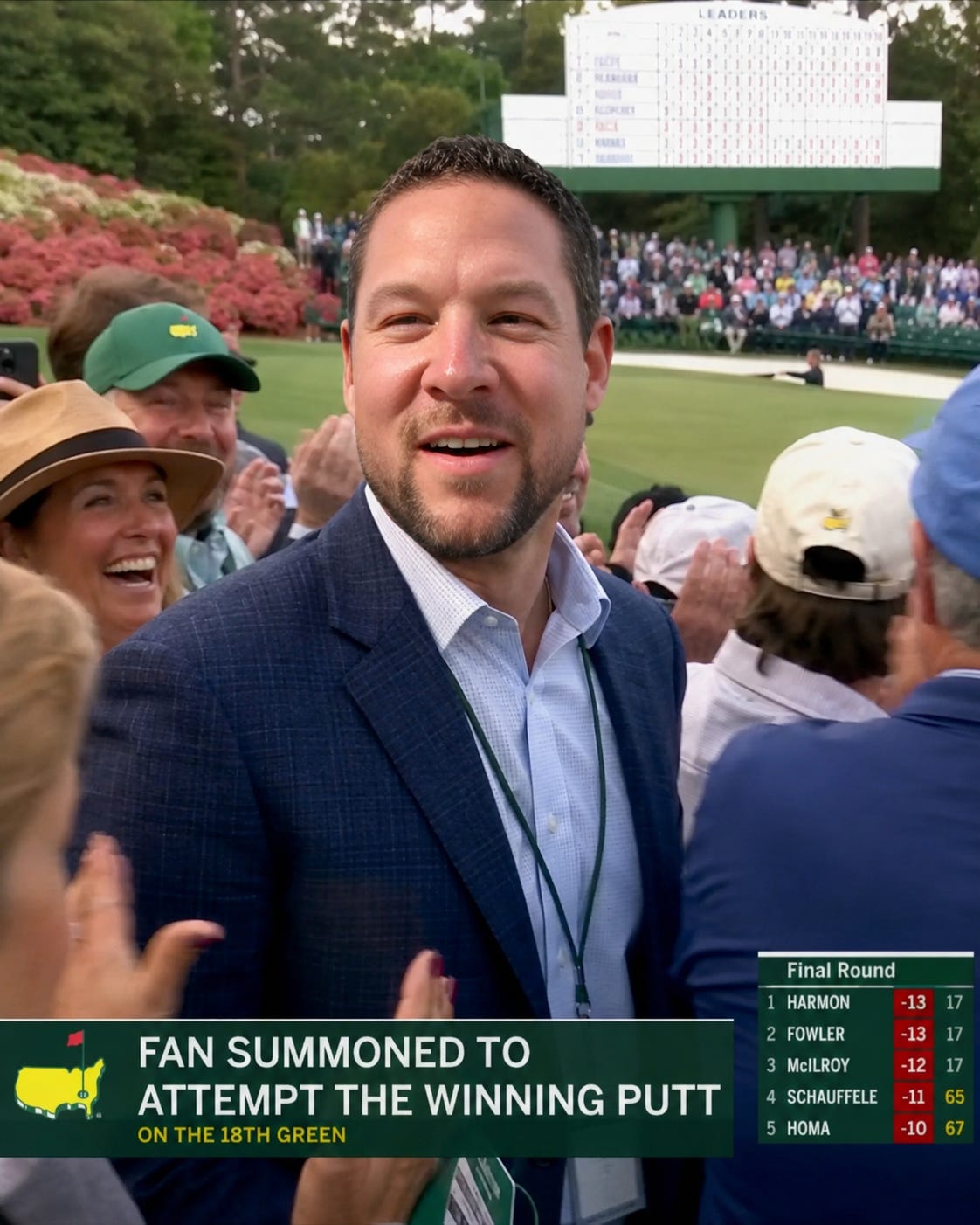
The clip: a fan in the gallery at a major golf championship gets spotted by the pro golfer — who looks a lot like Tiger Woods on a Sunday — pointed out from the crowd, summoned under the rope, handed the putter, and asked to attempt the winning putt on the 18th green. In front of 40,000 people. On live television.
The fan makes it.
The crowd loses its mind.
The fan — who is me — cannot process what just happened.
The whole thing is 45 seconds. It looks like something that went viral off a real broadcast feed. And every single frame of it was generated with AI.
Here is exactly how it was built.
The 3-Tool Stack
Before I get into the steps, here are the tools:
ChatGPT Image Gen 2.0 — created the reference still that anchored everything
Claude in Cowork — wrote and iterated the full production document before a single frame was generated
HeyGen Avatar Shots (Seedance 2.0) — generated the actual video clips
That’s it. No Premiere Pro. No After Effects. No camera. No green screen.
Step 1: Build the Scene Before You Build the Video
The first thing I needed was a reference image — not a headshot, not a phone photo, but something that put me visually inside the broadcast environment.
I uploaded my photo to ChatGPT Image Gen 2.0 alongside this prompt:
“Masters broadcast screenshot. A fan in a navy blazer has just been summoned from the gallery onto the 18th green. Lower-third graphic reads: FAN SUMMONED TO ATTEMPT THE WINNING PUTT. Leaderboard score bug bottom-right. Augusta atmosphere — azaleas, Georgia pines, green wooden scoreboard visible in background. The fan looks surprised and slightly amused. Live television — not a commercial.”
The output looked like it was pulled directly from a CBS Sports feed.
That image became the anchor for everything else. When you upload a reference photo into HeyGen, it gives the AI model your face, your outfit, and the surrounding environment all at once. One good reference image does more work than any text description can.
If the output looks like a stock photo or a render, add: “broadcast compression artifacts” and “720p television quality” to the prompt. That usually fixes it.
Step 2: Write the Production Document Before You Touch HeyGen
This is the step most people skip, and it’s why most people waste credits.
HeyGen Avatar Shots charges credits per generation — 4 credits per second, with no refunds for bad results. A 15-second clip costs 60 credits. Generate three of them badly and you’ve burned 180 credits on footage you can’t use.
The production document I wrote before generating a single clip had four parts:
1. The Consistency Block A chunk of text you copy-paste into every single shot prompt. It locks the subject appearance, environment, broadcast aesthetic, and lighting so every generated clip looks like it came from the same shoot. Without this, your clips will look like they were generated in three different universes.
2. Shot-by-Shot Prompts with Timestamps Each shot is a maximum of 15 seconds. Within that 15 seconds, you define specific beats using timestamps — [0s-5s], [5s-10s], [10s-15s] — and describe exactly what should happen at each moment. Camera angle, avatar action, crowd behavior, audio.
3. The Broadcaster Voice-Over Script Three acts, two voices. Play-by-play (higher, faster, chaotic) and color analyst (lower, slower, reverent). The energy arc across the three shots is what makes it feel like real television:
Shot 1: “Wait... wait wait wait — is he pointing into the gallery? He IS. I have NEVER seen this in 30 years covering this tournament.”
Shot 2: (barely above a whisper) “Forty thousand people. Not a sound. This man has never putted in front of more than his weekend foursome.”
Shot 3: “IT’S IN!!! IT WENT IN!!! I DON’T BELIEVE WHAT I JUST WITNESSED!!!”
I recorded the VO in ElevenLabs and layered it over the clips in HeyGen AI Studio after generation. HeyGen also generated its own broadcaster-style audio from the scene description — it sounded nearly identical to the real thing.
4. The Broadcast Realism Line This is the single most important thing I learned. This paragraph — included in every shot prompt — is the difference between “looks AI-generated” and “wait, is this actually real?”:
“NTSC broadcast color profile, over-saturated greens, 720p compression grain, chroma artifacts on high-contrast edges. Masters-style lower-third graphic bottom-left (dark green, gold text). Score leaderboard bug bottom-right. Network watermark top-right, semi-transparent. Authentic live television — not cinematic, not commercial.”
Telling the model what kind of footage you’re making — technically, specifically — changes the output entirely.
Step 3: Generate, Fix, Generate Again
The first two shots came out well. Shot 3 — the tension shot, the one where the subject stands alone on the green before putting — had problems on the first attempt.
Here is what went wrong and why:
Double putter in frame. When you describe a prop from multiple angles across several timestamps in the same generation, the model loses count. It generated two putters. Fix: add “ONE putter only, held in both hands” explicitly and reference the prop as little as possible across multiple angle descriptions.
Avatar speaking without any script. Close-up face shots trigger lip-sync behavior even in Voice-Over mode. The model sees a face near the camera and assumes it should be talking. Fix: add “lips remain closed and still throughout, no dialogue, no lip movement” — explicitly, in caps if needed.
Double holes on the green. This one surprised me. When you describe the cup from multiple perspectives — including a ground-level camera insert looking across the green — the model generates multiple cups. Fix: add “ONE hole on the green, located 20 feet directly ahead of the subject” and never ask for ground-level camera angles in the same generation as overhead or medium shots.
The root cause of all three: I asked for five distinct camera angles within a single 15-second generation. That’s too many perspective shifts for the model to maintain spatial consistency. I simplified Shot 2 to three beats — wide, medium close-up, medium — and it generated cleanly on the second attempt.
The Final Structure
Three shots. Hard cuts between each. No transitions.
Shot Duration Energy Shot 1 15s The summoning — golfer points, fan crosses the rope, putter handoff Shot 2 15s The tension — alone on the green, 40,000 people silent Shot 3 15s The putt, the drop, the eruption
The tonal whiplash between each hard cut — chaos to silence to chaos — is what makes it feel like live television. Transitions would have ruined it.
What This Actually Means
Two years ago, a clip like this required a production crew, a golf course, release forms, and a real budget.
Today it requires a clear idea, the right prompts, and two hours.
I’m not saying AI is replacing creativity. It’s doing the opposite. It’s removing the distance between what you can imagine and what you can actually make. The constraint used to be resources. Now the constraint is clarity of vision.
The people who figure out how to think precisely — how to describe what they see in their head in terms a model can act on — are going to have an enormous advantage in the next few years.
That’s what AI with Ant is about. Practical workflows, real outputs, nothing theoretical.
Anthony Brown is an Account Executive at Salesforce and the founder of AI with Ant — a Substack covering practical AI workflows in sales, content, and business..